
News
Featured
Contact Us
Contact: POWER DUKE
Phone: +86 18059884790
E-mail: plc66@qq.com
Add: fujian xiamen
- Warehouse: Spot
- Warranty: 365 days
- Quality: Original module
- Condition: New
- Shipping method: Courier delivery
- Contact person: LI MING
- Contact number: +86 18059884790
- WeChat:18059884790
- E-mail: plc66@qq.com
B&R X20CP1685 High‑Performance PLC CPU Module
Product Description
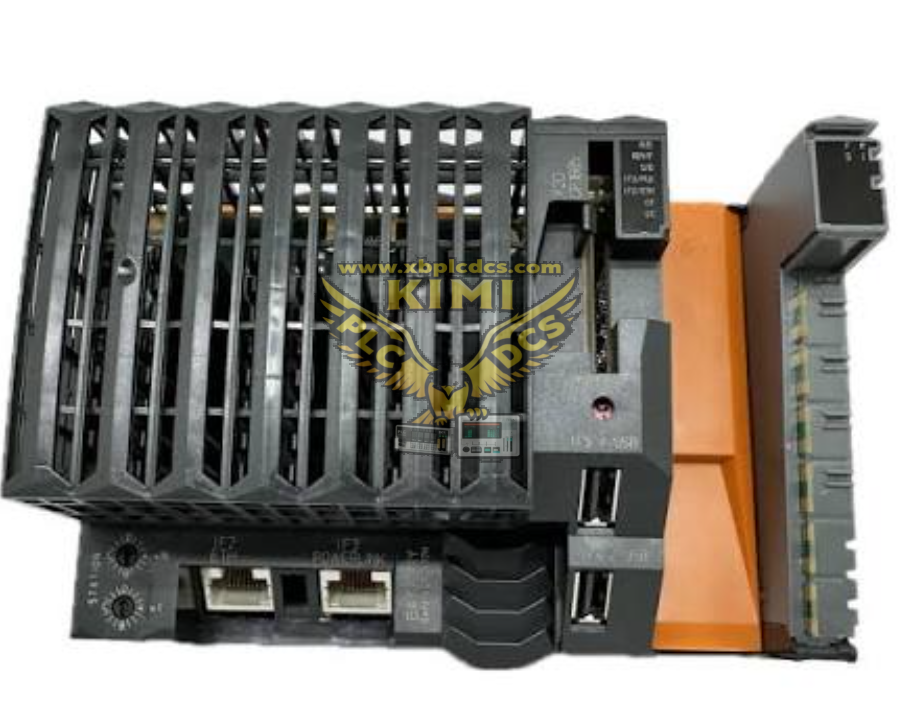
X20CP1685 is a high‑performance fanless CPU controller from B&R X20 automation system, powered by Intel Atom E3915 800 MHz processor with integrated I/O processor. It is equipped with 512 MB LPDDR4 SDRAM, 1 MB SRAM for retentive variables and 1 GB onboard eMMC flash memory, supporting CompactFlash removable storage for application and logging data. The unit integrates Gigabit TSN‑capable Ethernet, POWERLINK V2 real‑time fieldbus, RS232, dual‑USB ports and X2X‑Link master interface, plus one expansion slot for additional communication modules. Operating on 24 VDC power supply, it is DIN‑rail mount, IP20 rated, designed for demanding real‑time industrial automation control applications.
Product Features
- Intel Atom E3915 800 MHz fanless processor with floating‑point arithmetic and dedicated I/O processor for background I/O handling
- Memory configuration: 512 MB LPDDR4 RAM, 1 MB retentive SRAM, 1 GB onboard eMMC flash, CompactFlash removable storage slot
- Rich onboard interfaces: Gigabit TSN Ethernet, POWERLINK V2 supporting poll‑response chaining, RS232, 2×USB, X2X‑Link master for X20 I/O modules
- One expansion slot for optional communication interface modules to extend connectivity
- Real‑time deterministic control performance for fast motion and process tasks
- LED diagnostic indicators for run status, system error, communication and overload conditions
- Support programming via B&R Automation Studio engineering software, program download, trace and diagnostic functions
- Wide operating temperature range: ‑25 °C to 60 °C for horizontal DIN‑rail installation, compliant with CE, UL, ATEX Zone 2 certifications
- Isolation between Ethernet, POWERLINK and X2X‑Link interfaces to improve EMC noise immunity
- DIN‑rail mounting design, compact X20 series form factor for cabinet installation
Application Scenarios
- Motion control and machine automation for packaging, printing and plastic processing machinery
- Factory process control for production lines and assembly systems
- Real‑time POWERLINK‑based distributed I/O control system
- Industrial machinery requiring TSN gigabit Ethernet communication
- Energy, metallurgy and water‑treatment plant automation control cabinets
- Complex automation applications with large data logging and recipe storage requirements
- ATEX Zone 2 hazardous area compliant industrial control equipment
Common Problems & Troubleshooting
- CPU no power, RUN LED off: Check 24 VDC supply voltage and polarity; verify terminal block tightness; check cabinet fuse and input power derating requirements.
- System error LED red, boot failure: Inspect CompactFlash card status; verify valid application firmware; perform power‑cycle reset; check for corrupted onboard flash file‑system.
- Cannot connect via Automation Studio: Verify Ethernet IP address matching; check physical network cable; disable PC firewall; confirm target CPU network configuration settings.
- POWERLINK communication intermittent or failure: Check bus termination resistor; inspect cable integrity; verify node address configuration; eliminate electromagnetic interference.
- Retentive data loss after power‑off: Check internal backup lithium‑battery voltage; replace aged battery; confirm retentive variable memory allocation in project settings.
- Over‑temperature warning: Ensure sufficient cabinet ventilation space around module; do not exceed ambient temperature limits; clear dust accumulation on housing; follow installation orientation derating rules.
- X2X‑Link I/O module cannot be recognized: Check X2X‑Link bus wiring and end‑cover termination; verify correct X20 I/O module hardware configuration inside Automation Studio project.
- CompactFlash storage access fault: Use B&R recommended CF card type; check card physical insertion; verify file‑system health; replace faulty CompactFlash media.