

Product
Product
News
Featured
Contact Us
Contact: POWER DUKE
Phone: +86 18059884790
E-mail: plc66@qq.com
Add: fujian xiamen
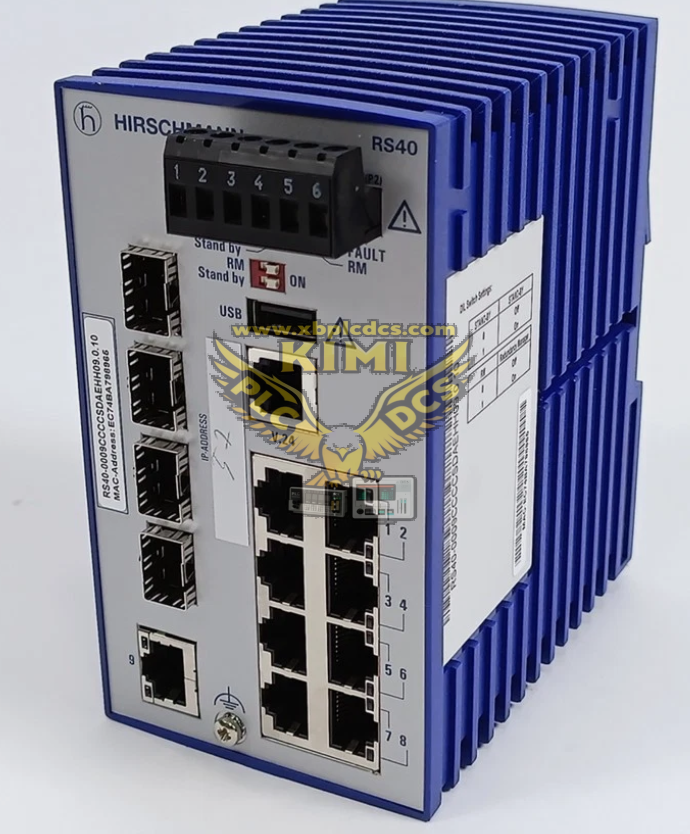
Hirschmann RS40‑0009CCCCSDAE Managed Gigabit Industrial Ethernet Switch
- Warehouse: Spot
- Warranty: 365 days
- Quality: Original module
- Condition: New
- Shipping method: Courier delivery
- Contact person: LI MING
- Contact number: +86 18059884790
- WeChat:18059884790
- E-mail: plc66@qq.com
Product Description
Hirschmann RS40‑0009CCCCSDAE Managed Gigabit Industrial Ethernet Switch
Product Description
RS40‑0009CCCCSDAE is Hirschmann Belden RS40 series compact DIN‑rail mount managed Layer 2 enhanced Gigabit industrial Ethernet switch. It provides total 9 Gigabit ports, including 5 fixed 10/100/1000BASE‑TX RJ45 ports and 4 RJ45/SFP combo ports for copper or fiber connection via SFP transceivers. Fan‑less store‑and‑forward switching architecture, IP20 housing, designed for installation inside industrial control cabinets. It supports comprehensive industrial network management functions, suitable for real‑time automation network in power, petrochemical and manufacturing site, stable continuous operation under harsh industrial electromagnetic environment.
Product Features
- 9‑port full Gigabit design: 5 × 10/100/1000 RJ45, 4 × GE RJ45/SFP combo ports; each combo port can use either copper RJ45 or SFP fiber transceiver
- Managed Layer 2 Enhanced firmware suite, support VLAN, QoS, IGMP snooping, port trunking, RSTP/MSTP rapid ring redundancy protocol
- Hirschmann Hiper‑Ring industrial ring redundancy, fast fault recovery for ring‑structured industrial network topology
- DIN‑rail mounting, IP20 protection grade, fan‑less passive cooling design, no fan maintenance required
- Wide operating temperature 0 °C ~ +60 °C, high EMC immunity compliant with industrial automation standards
- Dual redundant 24 VDC power input terminals, support power source redundancy to avoid single power point of failure
- Front‑panel LED indicators for power status, link activity, port speed and fault alarm for on‑site visual diagnosis
- Management access via Web‑UI, CLI console, SNMP v1/v2/v3, compatible with Hirschmann HiVision network management software
- Store‑and‑forward switching mode, support jumbo‑frame transmission for large‑volume industrial data transfer
- Compact mechanical dimension, suitable for limited cabinet installation space in field control cabinet
Application Scenarios
- Power plant DCS, PLC control cabinet real‑time industrial network, ring network construction for boiler and turbine auxiliary system
- Petrochemical refinery on‑site control network, connect field controller, HMI and monitoring equipment via copper and optical fiber hybrid networking
- Factory automation production line, metallurgy, water‑treatment plant managed Gigabit industrial network deployment
- Transportation infrastructure, tunnel and railway site control system requiring ring‑network redundancy protection
- Mixed copper‑fiber network application, using SFP module to extend long‑distance communication distance
- Spare‑part replacement and network expansion for existing Hirschmann RS20/RS30/RS40 installed‑base industrial network system
Common Problems & Troubleshooting
- Power LED off, switch cannot boot: Check dual 24 VDC redundant power input voltage; verify terminal wiring tightness; inspect cabinet power fuse; measure input terminal voltage under cabinet vibration.
- Port no‑link or link frequently flapping: Inspect RJ45 cable quality and crimp condition; check SFP transceiver compatibility and insertion status; verify combo port configuration (RJ45 or SFP priority); eliminate electromagnetic interference with high‑power cables.
- Cannot access web management or SNMP communication failure: Confirm switch IP address, subnet mask and gateway; check PC network segment matching; verify browser and SNMP parameter setting; restore factory configuration if configuration corruption occurs.
- Ring‑network communication interruption, Hiper‑Ring fault alarm: Check ring‑topology wiring; verify Hiper‑Ring / RSTP protocol enable status; confirm SFP fiber module and fiber cable health; avoid loop caused by mis‑wiring.
- High packet loss and network congestion: Review VLAN partition and QoS priority configuration; check broadcast‑storm caused by network loop; monitor network bandwidth utilization, optimize IGMP snooping setting for multicast traffic.
- SFP combo port cannot activate fiber link: Confirm compatible Hirschmann‑qualified SFP module; check fiber cable cleanliness and fiber‑connector loss; confirm combo port is switched to SFP mode instead of RJ45 mode.
- Spare‑part replacement mismatch risk: Use exact model RS40‑0009CCCCSDAE; distinguish from SDAP variant with different firmware feature set; re‑import full configuration file after hardware replacement, verify SFP compatibility.
Related recommendations