
News
Featured

Contact Us
Contact: POWER DUKE
Phone: +86 18059884790
E-mail: plc66@qq.com
Add: fujian xiamen
- Warehouse: Spot
- Warranty: 365 days
- Quality: Original module
- Condition: New
- Shipping method: Courier delivery
- Contact person: LI MING
- Contact number: +86 18059884790
- WeChat:18059884790
- E-mail: plc66@qq.com
Allen‑Bradley 2711P‑T10C22D9P PanelView Plus 7 Performance 10.4" Touch HMI Terminal
1. Product Description
2711P‑T10C22D9P is a high-performance industrial touchscreen HMI terminal belonging to Rockwell Automation PanelView Plus 7 Performance series, designed for high-demand factory automation monitoring and operator control. It runs Windows 10 IoT Core embedded OS, paired with FactoryTalk View Machine Edition development software for seamless integration with Allen‑Bradley ControlLogix, CompactLogix and Micro800 PLC systems.
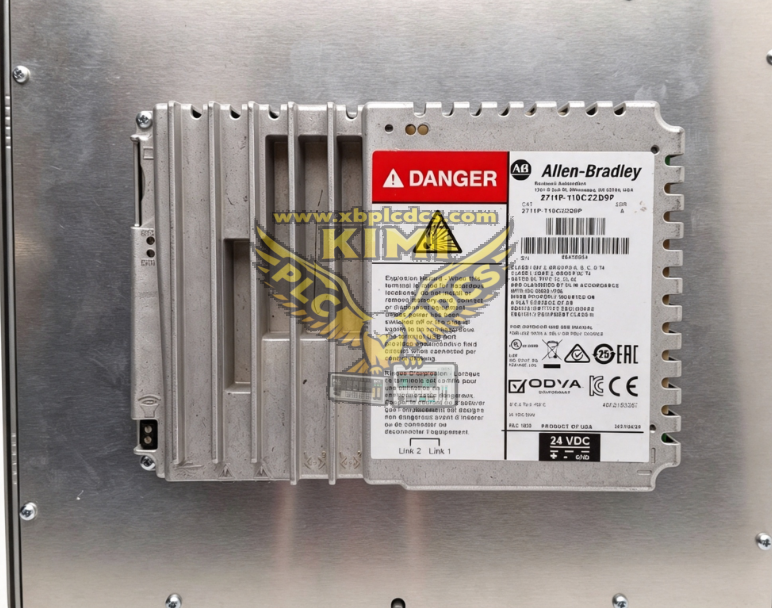
Core Technical Specifications:
1. Display: 10.4-inch 4:3 TFT color LCD, SVGA 800×600 resolution, 18-bit true color, 300 nits brightness, LED backlight with minimum 50,000-hour service life
2. Touch Input: Analog resistive touchscreen, rated for 1 million touch presses, 100g operating actuation force
3. Memory: 512 MB RAM, 512 MB non-volatile flash storage, 80 MB dedicated application memory for HMI project files
4. Communication Interfaces: Dual 10/100Mbps RJ45 Ethernet ports with embedded switch, DLR ring topology support; 1×RS232 serial port; 3×USB 2.0 Type‑A ports; SDHC card slot for project backup
5. Power Supply: Nominal 24VDC, wide operating range 18~30VDC, reverse polarity protection
6. Environmental Rating: Operating temperature 0°C ~ +55°C, storage -25°C ~ +70°C, 5%~95% non‑condensing humidity, 2G anti-vibration compliance
7. Mechanical & Protection: IP66 front panel for cabinet mounting, conformal coating optional variant; Gross weight ~1.81kg
8. Certifications: UL, CE, Class I Div 2 hazardous location approval
9. Software Compatibility: FactoryTalk View Studio ME V2.6+, FactoryTalk ViewPoint web remote access
2. Core Product Functions
- Real-Time Process Visualization & Operator Control Displays live PLC tag data including pressure, temperature, speed, motor status and production counts; supports touch-based control functions: valve open/close, motor start/stop, recipe selection, alarm acknowledgment and machine parameter adjustment.
- Dual Ethernet DLR Redundant Networking Dual isolated Ethernet ports support Device Level Ring (DLR) topology, ensuring uninterrupted HMI-PLC communication if one network cable fails; compatible with star, linear and ring EtherNet/IP plant network architectures.
- Comprehensive Alarm Management System Classifies fault alarms by priority, records timestamped alarm history, supports alarm filtering, pop-up alert windows and exportable alarm logs via USB/SD card for production audit tracking.
- Batch Recipe Storage & Parameter Management Stores multiple production recipes locally in flash memory; operators load, edit and save batch parameters on‑screen, eliminating manual PLC program modifications for product changeovers.
- Data Logging & Historical Trend Visualization Captures continuous process trend data, displays real-time and historical curve charts; exports logged CSV data to USB storage for offline quality analysis and compliance reporting.
- Remote Web Monitoring via FactoryTalk ViewPoint Built-in web server enables secure remote access to HMI screens from office PCs or mobile devices over plant Ethernet without additional SCADA servers.
- Offline Project Backup & Rapid Recovery SD card slot saves full HMI application, firmware and configuration; in case of terminal failure, projects can be restored to a replacement unit within minutes to minimize production downtime.
- Multi‑Device Serial & USB Peripheral Support RS232 port connects barcode scanners, serial printers and legacy serial instruments; USB ports support mouse, keyboard, USB flash drives and industrial printers for local data export.
- Built‑In System Diagnostics & Status Monitoring Onboard LED indicators for power, Ethernet link, fault and storage status; internal diagnostic menu displays touchscreen calibration, network traffic and memory utilization for on-site troubleshooting.
3. Typical Application Scenarios
- Automotive Assembly & Robotic Welding Lines Central operator interface for robotic arms, conveyor systems, safety interlock monitoring and production batch counting with DLR redundant EtherNet/IP networking.
- Food & Beverage Packaging & Filling Equipment Recipe management for filling volume, temperature control, batch traceability and quality alarm logging for hygienic food-grade manufacturing environments.
- Water & Wastewater Treatment Plants Monitoring pump VFD status, tank level, pH sensor readings, dosing valve control and wastewater discharge alarm management for municipal water facilities.
- Oil & Gas Refinery & Pipeline Control Rooms Hazardous Class I Div 2 certified terminal for remote valve actuator monitoring, flow pressure tracking and emergency shutdown alarm acknowledgment.
- Material Handling & Conveyor Distribution Warehouses Palletizing robot control, conveyor speed adjustment, barcode scan data display and warehouse throughput trend recording.
- Plastic Injection & Blow Molding Machinery Real-time mold temperature, injection pressure and cycle time visualization, multi-mold recipe storage and machine fault alert display.
- Power Generation Turbine & Substation Auxiliary Control Generator load monitoring, cooling system status tracking and grid protection alarm visualization for thermal power plants.
- Industrial Machine Retrofit & Factory Upgrade Projects Direct replacement for legacy PanelView Plus 6/700 terminals to add DLR redundancy, larger memory and web remote monitoring functionality.
4. Common Faults & Troubleshooting Solutions
4.1 Power LED Off, HMI Fails to Boot Up
Causes: Incorrect 24VDC wiring polarity; unstable supply voltage outside 18~30VDC range; blown internal power fuse; loose cabinet terminal wiring. Solutions: Reverse DC power positive/negative connections; measure power supply output voltage; inspect and replace blown power fuse; re-tighten power terminal block connectors firmly.
4.2 Ethernet Link Loss, No PLC Data Communication
Causes: Damaged industrial shielded Ethernet cable; duplicate IP address conflict on plant network; DLR ring missing termination resistor; mismatched subnet IP between HMI and ControlLogix PLC. Solutions: Replace CAT5e/CAT6 industrial Ethernet cable; use RSLinx to locate conflicting IP devices and assign unique static IP; complete DLR ring termination setup; reconfigure HMI IP to match PLC control subnet.
4.3 Unresponsive or Inaccurate Touchscreen Input
Causes: Dirt/oil contamination on front touch overlay; misaligned touch calibration data; degraded resistive touch sensor; excessive cabinet vibration loosening touch panel wiring. Solutions: Clean touchscreen with lint-free isopropyl alcohol wipes; run factory touch calibration utility in HMI system menu; replace touch overlay if sensor wear confirmed; install anti-vibration mounting brackets.
4.4 Dim/Flickering Display Backlight
Causes: Aging LED backlight nearing end of service life; high cabinet operating temperature accelerating backlight degradation; corrupted display brightness configuration. Solutions: Adjust brightness setting in HMI display menu; improve cabinet ventilation to reduce internal heat; replace HMI front display assembly if backlight permanent failure occurs.
4.5 Corrupted HMI Project, Missing Screens or Alarm Log Data
Causes: Abnormal power cut during project save operation; damaged SD flash storage card; insufficient application memory for large trend/alarm logs. Solutions: Restore backup project file from SD card or USB flash drive; re-download validated FactoryTalk View ME project; clear old historical log data to free application memory space.
4.6 USB/RS232 Peripherals Not Detected
Causes: Damaged USB/serial port wiring; mismatched RS232 baud rate/parity parameters; faulty barcode printer/scanner peripheral hardware. Solutions: Swap alternative USB port for peripheral connection; match serial communication parameters between HMI and field device; test peripheral equipment on a spare PC to confirm hardware integrity.
4.7 Constant System Fault Alarm, Slow HMI Screen Refresh
Causes: Excessive background trend logging tasks overloading memory; outdated incompatible HMI firmware; cabinet overheating causing CPU throttling. Solutions: Reduce frequency of non-critical trend data logging; upgrade HMI firmware to official Rockwell compatible revision; clean cabinet cooling vents and install additional ventilation fans.
5. Import & Compliance Supporting Documents
1. Customs Documents: Certificate of Origin (COO), Factory Certificate of Conformity (COC), UL/CE/Class I Div 2 Hazardous Location Certification 2. Safety Files: SDS/MSDS for HMI electronic components, touch panel and LCD display materials 3. Technical Data: Official 2711P datasheet, installation mounting manual, FactoryTalk View ME configuration guide, firmware release notes 4. HS Code: 85285130 Industrial Touchscreen Operator Interface HMI Terminal 5. Country of Origin: United States; Gross Weight: ~1.81kg 6. Lead Time: In stock 3~7 working days; factory original order 8~14 weeks 7. Matching Spare Parts & Accessories: Protective touch overlay, SDHC memory card, industrial CAT6 Ethernet cable, replacement power terminal block, conformal coating variant (2711P‑T10C22D9PK), USB flash drive for project backup